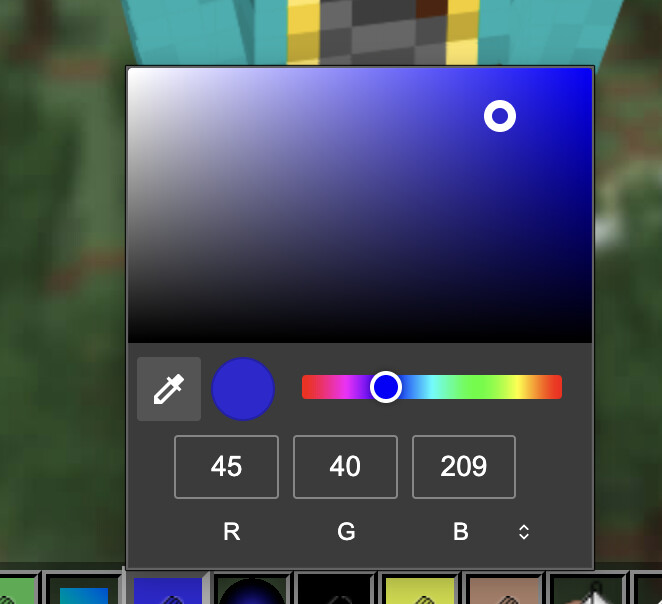
i don’t know when exactly these changes happened as I haven’t been on the skin editor in about a week, but I just went back on the skin editor today and found that all of the UI was different, and some features were added or modified as well. I usually love new changes, and a lot of the features seem to be useful (slim arms button, shade variance, etc.) but some of the features are making it quite difficult for me to make a skin now.
My main issues:
The new color picking menu. It opens up an entirely new window now, and makes that god awful windows noise if I accidentally click anywhere else while it’s still open. I’m no longer able to easily choose one of the different color boxes and color pick a new color because it automatically opens up that window. As well as this, it doesn’t seem to display the hex code anywhere and as far as I’m aware there’s no way to choose to have it displayed anywhere either. This part especially is extremely frustrating to me as my process of making skins involves going between multiple different websites to help me make my skins (photopea, coolers gradient maker, css gradient) and it was helpful to be able to just copy the hex code on all of them. Now I’m unable to do that and it seems I would have to manually type in the RGB values every time I want to use the same exact color from nova skin. Which is a lot of the time.
My second issue is with saving the skin files. A big part of my skin making process is also saving multiple drafts, especially as I switch between Nova Skin and Photopea, and now it no longer lets me right click to save the skin file. Instead, I have to give it a name and save it, which I checked and it seems to also upload the skin. I’m going to be blunt, I hate everything about that. I don’t want to have to automatically upload my skins when I’m still working on them, or worry about them accidentally uploading just because I save a draft of them. When I went onto my profile to see if they were actually updated, the skin was displayed but I was unable to delete it as it said it was already deleted or didn’t exist, but it still very clearly existed on my profile when I was logged in and logged out.
Most of the new changes are good, and I can adjust to the other things that I don’t really like. It’s just these two major issues that I haven’t been able to find a fix to that so far are seeming like they are going to majorly impact my activity and usage of this website. I really don’t want to use this website less, I love it and it’s become my favorite skin editor, but I can’t seem to use it now without becoming genuinely frustrated at the new features.